
 Ecosystem shared services
Try a sample form
Component demonstration only. Use fictional text. Nothing is saved or sent.
PLAIN DECISION ECOSYSTEM
Simple surfaces. Clear actions. Room to focus.
Shared components and guidance. Open the section you need.
ECOSYSTEM DESIGN SYSTEM · VISUAL BASELINE v1.0
Clear interfaces across the ecosystem. Shared behavior, distinct brands, and access only to the work each person is permitted to do.
Shared reference · ecosystem adoption tracked separatelyUpdated 31 October 2026. This catalogue distinguishes the Move reference components, existing partial services and planned contracts. Shared login, cross-app adoption and product acceptance require separate evidence.
ADOPTED BASELINE · VISUAL & TOOL MAP STANDARD v1.0
Jet approved this baseline on 31 October 2026. Group by purpose, explain the job, and show one concrete example. Use the format that helps the task.
A small list can stay a small list. Do not invent work, metrics or a second tracker to fill a visual.
Official records hold the decision or transaction. A link points to a record; a notification tells someone about it. Neither creates a second official record.
A replacement version must demonstrate better understanding, usability, accessibility, reliability, cost or maintenance effort. Document the comparison, tradeoffs and adoption decision. Retain v1.0 for comparison.
Policy adoption does not establish live implementation. This preview awaits release authorization.
Read the complete v1.0 standard · Open tool guidance · Follow a handoff
PURPOSE BEFORE PROVIDERS
Approved roles, not a claim that every account or connection is enabled. The existing Move site remains on Vercel.
Run → build → guide. Add another tool only for a clear gap. Open a purpose, then a tool.
Approved role. Move Team currently uses Vercel; no hosting move is implied.
Official documentation for Cloudflare ↗Default for new pilots: one identity system, different access. Database and file policies enforce the boundary.
Official documentation for Supabase ↗Source and release history remain here; this does not replace the established project tracker.
Official documentation for GitHub ↗A generated answer or passing local test is separate from a verified live result.
Review role preserved. Review is claimed only when a receipt exists; it is not an automatic publication gate.
Prepared pattern. A diagram is not a running workflow. Verify credentials, idempotency and failure handling before activation.
Official documentation for n8n ↗Retain the established project tracker. A new map does not create a second tracker.
Official documentation for Notion ↗Keep drafts and research distinct from approved records. Respect source permissions.
Official documentation for Google / Gemini ↗Choose one identity approach for the app across customers, support and admins. Do not split providers by user type.
Official documentation for Clerk ↗Select only when required. Verify sender/domain setup, consent, account entitlement, limits and billing.
Document the gap, compatibility, permissions, cost and exit path before adding it.
Illustrative new pilot. This is a handoff pattern, not evidence of a running customer service.
Sign in and save a request in the app. Supabase supplies the pilot identity, request record and file permissions.
Open only the cases permitted for this organization and app. Add an update to the official request record.
n8n uses the request ID to avoid duplicate work, retries safely and alerts the owner on failure. Email contains a permitted link or notification.
Review exceptions within their assigned scope. The official app record holds the outcome; a notification is not the record.
Customers, support and admins share one identity system. Their organization, app and role permissions differ. Notion holds the procedure and decisions; the established tracker keeps delivery work.
Name the user, one useful task, accountable owner, official record and acceptance evidence. Keep work in the established tracker.
Inspect existing hosting and identity. Check current documentation, compatibility, billing, account entitlements and limits. Keep working infrastructure unless a change has a documented benefit.
Use the Supabase default for a new pilot unless a working or justified alternative fits better. Enforce organization/app/role access for records and files; test denied access too.
Add n8n only for a needed handoff. Test retries, duplicate protection, failure alerts and the official record. Add email or a specialist only for a real requirement.
ChatGPT/Codex builds and verifies. Claude reviews when commissioned; retain its receipt. Check touch, keyboard, phone widths and the complete affected flow. Release only within the current authorization and record live evidence.
JET’S ROADMAP v1 · ADOPTED DELIVERY GUIDELINE · 31 OCTOBER 2026
For the CTO, technology and AI/automation delivery, and participating entities. Follow Milestones 1–9 in order. Each milestone reuses the shared foundation; services are built once and extended for permitted consumers. Requirements are adopted; completion needs its own evidence.
Read the CTO guide and source wording · Inspect the 16 service contracts · Tool roles and build method
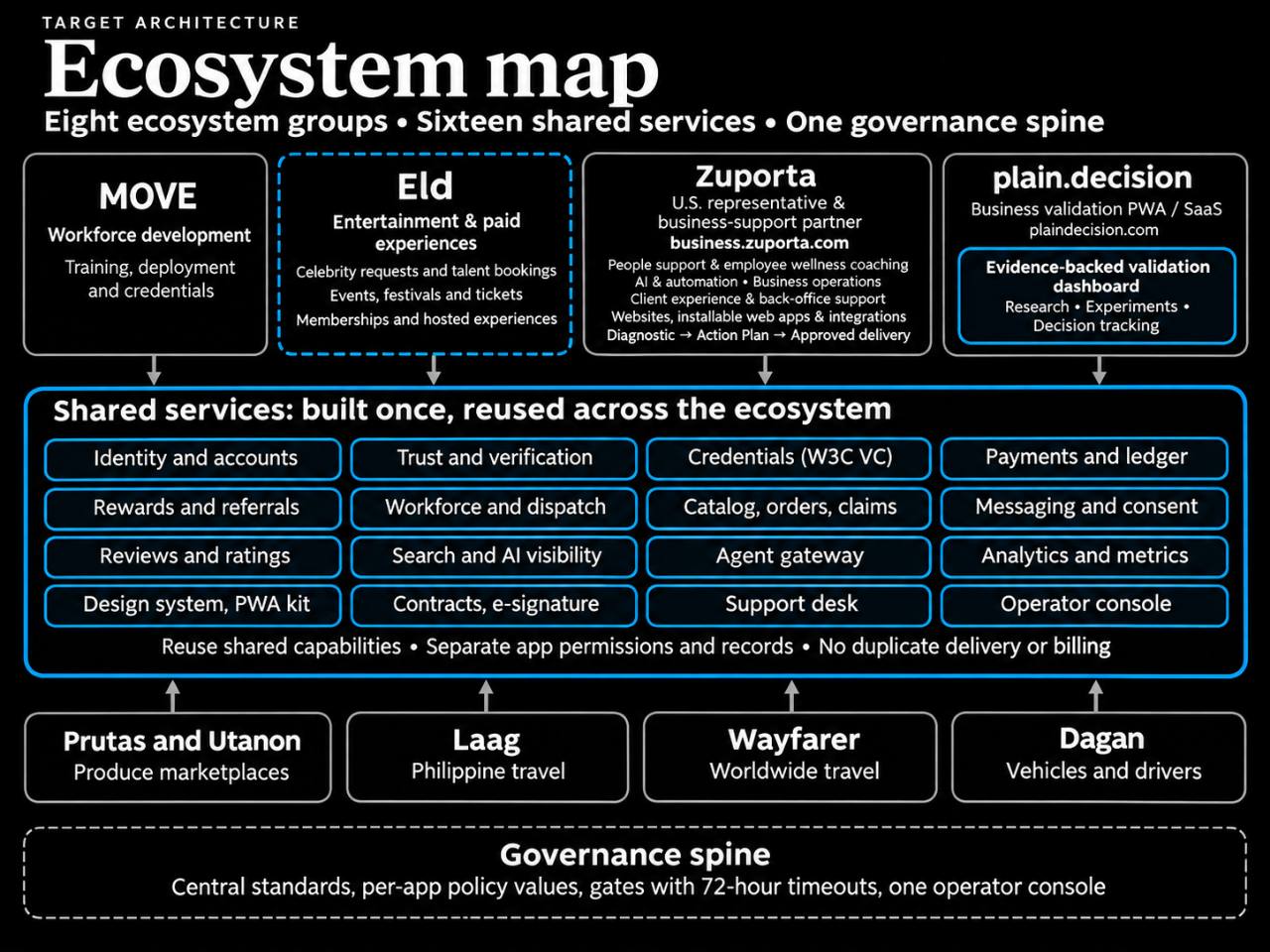
Target architecture, not a verified live inventory. Wayfarer remains the worldwide-travel group; no numbered milestone was assigned to it. The image uses Utanon; Milestone 9 retains Jet’s requested Utan v1.
US sme’s support
Jet’s scope: One-stop US sme’s service based business solutions. Focus on speed, mobile-first (PWA), and convenience.
Must-have shared services:
Suggested completion evidence: A customer signs in, submits a support request and receives a permitted acknowledgement. Assigned support resolves it; an authorized operator can inspect and stop the automation. Prove consent, referral attribution, duplicate prevention, failure handling and denied access. Record a phone/PWA journey and actual speed measurements.
Scope adopted · milestone acceptance not established. Design System: Jet reports Done; visual-preview QA passed conditionally. This is not evidence that the entire ecosystem design/PWA service is live.
Jet’s scope: pH workforce mobilization & global training competency.
Must-have shared services:
Suggested completion evidence: An authorized person verifies a worker, records training/competency evidence, obtains the required agreement, assigns a suitable available worker and records completion plus permitted feedback. Prove reassignment, document-access boundaries and the dispute/correction path.
Scope adopted · milestone acceptance not established.
Jet’s scope: sme PWA Saas(hercules.app-style) + (preuve.ai-style)Fully Unlocked Validation/Analytics and metrics Dashboard
Must-have shared services:
Suggested completion evidence: One SME completes an agreed PWA workflow and sees its own source-backed validation and metrics with dates and definitions. Verify credential issue/verification/status, discovery evidence, and a scoped order/payment/ledger/claim journey including retries, duplicate prevention and reconciliation. Unknown metrics stay unknown.
Scope adopted · milestone acceptance not established.
Jet’s scope: Entertainment-talent bookings, celebrity requests, events, festivals, tickets, memberships and hosted paid experiences. Generic business support remains under Zuporta; travel remains under Laag and Wayfarer.
Reuse the shared foundation. Additional service scope awaits the milestone brief.
Suggested completion evidence: Define one expansion pilot, audience, delivery owner, consent, operating capacity, commercial terms and measurable outcome before building. Reuse accepted shared services. This description does not establish a Cameo or Burning Man partnership.
Scope adopted · milestone acceptance not established.
Jet’s scope: Credentials: RWA on NFT as ID
Reuse the shared foundation. Additional service scope awaits the milestone brief.
Suggested completion evidence: Prepare the credential/asset model and prove issuer authority, holder control, verification, status/revocation, recovery, privacy and interoperability. W3C credentials and NFT identity are distinct mechanisms. Review ownership, transferability, custody and costs before any real issuance; the roadmap alone does not authorize minting or financial activity.
Scope adopted · milestone acceptance not established.
Jet’s scope: Value proposition and MVP details not yet specified.
Image reference: Philippine travel
Reuse the shared foundation. Additional service scope awaits the milestone brief.
Suggested completion evidence: Agree the MVP user journey, accountable owner, data source, commercial/operational boundaries and acceptance evidence before implementation. Philippine travel is image context, not a complete product specification.
Scope adopted · milestone acceptance not established.
Jet’s scope: Value proposition and MVP details not yet specified.
Image reference: Vehicles and drivers
Reuse the shared foundation. Additional service scope awaits the milestone brief.
Suggested completion evidence: Agree the MVP user journey, accountable owner, data source, commercial/operational boundaries and acceptance evidence before implementation. Vehicles and drivers is image context, not a complete product specification.
Scope adopted · milestone acceptance not established.
Jet’s scope: Value proposition and MVP details not yet specified.
Image reference: Produce marketplaces (Prutas and Utanon group)
Reuse the shared foundation. Additional service scope awaits the milestone brief.
Suggested completion evidence: Agree the MVP user journey, accountable owner, data source, commercial/operational boundaries and acceptance evidence before implementation. Reuse the shared catalogue, payments, trust and support contracts where required.
Scope adopted · milestone acceptance not established.
Jet’s scope: Value proposition and MVP details not yet specified.
Image reference: Image names the group Prutas and Utanon
Reuse the shared foundation. Additional service scope awaits the milestone brief.
Suggested completion evidence: Preserve the requested name Utan v1. Confirm whether Utan and Utanon are the same product before changing domains, identifiers or records. Agree the MVP journey and acceptance evidence; do not silently rename the existing group.
Scope adopted · milestone acceptance not established.
Handles user authentication, login providers (Google, email/password), session management, and user profiles across your apps.
Manages loyalty points, discount codes, user referral tracking, and invite incentives to drive user growth.
(Done): https://moveteam.plaindecision.com/design-system
The ticketing and help system where users submit bug reports, questions, or requests, and where you manage support responses.
Central command center and human-in-the-loop dashboard where founders / authorize personnel monitor, manage, and override all automated workflows, apps, and agent systems.
system module that governs how your apps communicate with users and ensures you have explicit, logged permission to do so.
The centralized API routing and security layer that manages communication between your autonomous AI agents, external LLM providers, and internal backend services.
The reputation and feedback module that aggregates customer ratings, star reviews, and text testimonials for your services
Tracks staff profiles, roles, availability, and permissions. Automatically or manually assigns incoming jobs, support tickets, or field tasks to the right person based on their skills and availability.
The security and compliance module that validates user identities, verifies business documents, and runs compliance or fraud checks across your platform.
The legal and agreement execution layer of your ecosystem.
The telemetry and tracking layer for your apps.
The decentralized identity module that issues, holds, and verifies W3C-compliant Verifiable Credentials (digital badges, certificates, or verifiable proofs like professional licenses or completion certificates).
The optimization and tracking layer that ensures your apps, products, and services are discovered, indexed, and accurately cited by search engines and conversational AI models (like ChatGPT, Gemini, and Perplexity).
The financial engine and system of record for tracking money movement, balances, and transactions across your apps.
The e-commerce and transaction management engine for your products or services.
Milestone 3 data-source requirement: Most suitable/fit/reliable ideally free or at least minimal setup and sustainable long term
ROADMAP v1 · PREPARED HANDOFF
Lemuel Duyag is the CTO. This handoff connects the adopted roadmap, architecture reference and QA evidence with his technical delivery and chosen AI assistant.
Open the CTO + AI handoff in Linear ↗ · Open ELD-28 and the handoff ZIP ↗
Linear workspace access is required. In ELD-28, open Resources → Lemuel + AI — Roadmap v1 handoff pack. The private AI brief and source index stay in the handoff package.
Read 00-START-HERE.md. Reconcile the two existing CTO handoffs and current source before reopening work. Choose one bounded implementation task with an owner, acceptance evidence and actual release authority.
Use the complete package and 01-AI-TASK-BRIEF.txt. First reconcile Milestone 1’s seven services read-only, then return 02-RESULT-AND-DECISION-TEMPLATE.md with evidence and one recommended customer-support pilot. Missing source access stays explicit.
Human brief, AI task brief, seven-service worksheet, result template, source index, roadmap, architecture image, visual standard, final-QA evidence and the two earlier opening briefs. The ZIP’s integrity and thirteen file hashes were checked.
Prepared and available in Linear does not mean received, accepted or executed. Follow the nine milestones in order, reuse the sixteen services, and keep one tracker and one writer per checkout. Production and live automation retain their actual authorization and acceptance requirements.
INFORMATION & WORKFLOW STANDARD v1.0 · 31 OCTOBER 2026
Local system means the computer and its folders. These are the adopted jobs for the five tools; account setup, entitlements and live synchronization need separate evidence. GitHub remains the source-code and release-history owner.
Read the complete standard and image transcription · Follow client onboarding · Choose a visual
Use an existing Notion home page as the team’s front door, linking to the current handbook, Linear, Drive and app. A front door is navigation; it does not copy their records. This guide does not establish that the Notion page or any integration has been configured.
PREPARED WORKFLOW · ZUPORTA CLIENT ONBOARDING
Read the current onboarding procedure and quality checklist. Link the procedure version to the client’s Linear work.
Track the assigned onboarding tasks, owners, deadlines, blockers and acceptance evidence. Link the app record and Drive deliverables.
Keep the signed agreement and deliverables under the agreed access. Use their stable file links rather than copying “final” versions into every tool.
Keep the account and authoritative customer-facing onboarding state in the app. Change it only when the defined business completion conditions have been verified.
Produce and test working files. Save accepted company deliverables in their shared home and keep managed backups; local work is not the team’s only accessible copy.
Define the required business checks first. A completed Linear task does not by itself prove customer onboarding is complete. An authorized automation may use stable client, issue, file and app-record IDs, verify the evidence, update the official app record, and acknowledge the result.
Choose a single writer for each field; keep scoped access, consent where needed, revision checks, duplicate protection, bounded retries and a failure alert. Display pending/failed synchronization honestly. Reconcile reversals and corrections with an audit trail. Staff update the owning record rather than maintaining two status fields manually. If automation is unavailable, use one accountable manual reconciliation owner and mark the linked view as pending.
Prepared design only: no n8n workflow, database write, consent grant or live synchronization is activated by this diagram.
SUPPLIED IMAGE · EXACT TRANSCRIPTION
Best starting point: Collapsible taxonomy tree
Best starting point: System map / network graph
Best starting point: Swimlane diagram
Best starting point: Decision tree
Best starting point: Kanban board
Best starting point: Dashboard
Image note: Your recording combines three concepts: a hierarchical tree layout, expandable/collapsible interaction, and a taxonomy of personal development topics.
The note above is transcribed from the supplied image; it is not a claim that this review inspected the recording. Application guidance: use taxonomy trees for navigation, system maps for relationships, swimlanes for handoffs, decision trees for choices, Kanban in Linear for work, and dashboards only with real defined metrics and dated sources.
The five-tool roles and one-home rule come from Jet’s supplied text; the six visual rules and recording note come from his supplied image. Vendor documentation supports the capabilities; this allocation is the ecosystem’s operating policy. Prepared implementation notes are separate from observed live outcomes.
No files were migrated, access expanded, Notion home created or database/automation activated by this standards update.
DISTINCT EXPERIENCES
Customers register and work through their public app. The restricted operations portal manages shared services for approved strategic partners, team, support and internal roles. Shared infrastructure does not grant access to another app’s records.
| Website | Experience | Access boundary |
|---|---|---|
| business.zuporta.com | Zuporta public and customer experience | App-specific onboarding, membership and records |
| plaindecision.com | Plain Decision public and customer experience | The customer’s authorized results and features |
| ecosystem.plaindecision.com | Restricted operations | Explicit grants, active scope, native MFA and session checks |
| accounts.plaindecision.com | Proposed neutral account address | Not assumed provisioned or approved for callbacks |
| Other ecosystem apps | Dedicated customer experiences | Same service contracts, separately assigned permissions |
The server resolves a registered app from its fixed deployment configuration and validated origin. That configuration supplies stable app ID, approved domains, brand wording, callbacks, return destinations, onboarding, versioned terms, service settings and app policy. A browser-supplied app ID, role, tenant or return URL never grants authority.
Unapproved callbacks and incomplete terms keep account activation unavailable. Identity remains mapped by verified issuer and subject. Matching email addresses do not merge accounts.
REUSABLE BEHAVIOR
Use Move’s existing semantic tokens, original chess artwork, typography, spacing and Light / Dark / System controls. Public apps retain their own approved brand assets. Share form behavior, focus, feedback and permission states.
Component demonstration only. Use fictional text. Nothing is saved or sent.
Keep the next action clear, preserve the user’s input and explain permission limits.
Choose a state or check the sample form.
Sample organization · Sample venture · Sample role
Internal screens must show the current organization, venture and permitted role. A partner sees only explicitly assigned functions and records. Displaying this sample does not create a role or grant access.
Use native controls, visible keyboard focus, linked error summaries, associated hints, accessible status messages, readable contrast and at least 44 × 44 CSS-pixel targets. Test reflow at phone widths and 200% zoom, both themes, reduced motion and keyboard navigation. WCAG 2.2 AA applies to complete processes; automated checks do not certify conformance.
Only explicitly approved public assets belong in an offline shell. Never cache tokens, authenticated responses or private files. Preserve the Book’s existing device saves and scoped service worker. Install, old-worker upgrade, assistive-technology and physical-device checks remain separate evidence.
The earlier research clarification for DS-027 and DS-033–035 remains: required accessibility behavior stays required even when a suggested implementation is optional. Media alternatives and motion preferences need their own checks.
SEVEN GROUPS · ONE GOVERNANCE FOUNDATION
Each group keeps its purpose and customer experience. The shared layer supplies permitted functions through secured interfaces.
Central governance supplies common controls. Each app supplies its own policy values. Every protected action checks the person, app, organization, venture and permission.
Preuve.ai is the native validation dashboard within Plain Decision. “Fully unlocked validation dashboard” means the customer’s authorized results and features; it does not unlock internal operations or other customers’ records.
A 72-hour approval timeout escalates or expires the request. It never approves automatically.
EVIDENCE BEFORE ACCEPTANCE
Updated Move Team catalogue, preserved ecosystem map, shared feedback and form behavior, safe scope display and a server-only app configuration contract. Local checks are recorded in the review package.
Real registration, recovery, cross-domain session reuse, provider logout/revocation, deployment acceptance and physical-device checks. No SSO or production-readiness claim is made.
Required security checks cover guests, internal page/API/database denial, cross-organization and cross-venture isolation, role tampering, callback rejection, revoked sessions and removed staff grants. Existing intake, referral, CRM and shared-service behavior must retain its own regression evidence.
Private tables with RLS and no client policies may intentionally deny direct access. Inspect grants and privileged-function authorization before changing a warning. Preserve identity mappings and authorization helpers; never remove a control just to clear an advisory.
This implementation guide retains the original source permissions and earlier research distinctions. Jet’s direct October 31 adoption of Visual & Tool Map Standard v1.0 defines this update; linked Notion records continue to own their other approved requirements.
This catalogue documents the design foundation. Authentication, data, subscriptions and access retain their separate controls. Human usability studies and independent product acceptance remain separate.
Approved architecture · 5 November 2026. Configuration describes intended ownership; each integration needs separate evidence.
Zuporta: Diagnostic → Action Plan → approved delivery. plain.decision: reusable business-validation software and evidence dashboard. MOVE prepares the workforce; Zuporta delivers business services. Eld owns entertainment bookings and hosted experiences; Laag and Wayfarer own travel.
Reuse sixteen shared services. Separate app permissions and records. No duplicate delivery or billing. Central standards and per-app policy values remain in force. Unanswered gates expire after 72 hours; silence never approves.
For app owners and builders
Import the package into your build and serve its assets from your app’s origin. The gallery uses the same portable modules. Apply component styles beneath .ds-page; map --eco-* tokens to an approved app theme.
<link rel="stylesheet" href="/shared/design-system/v1.0.0/tokens.css">
<link rel="stylesheet" href="/shared/design-system/v1.0.0/components.css">
<!-- Also load visuals.css when using the view-switcher patterns. -->
<link rel="stylesheet" href="/shared/design-system/v1.0.0/visuals.css">
import {bindForm, setFeedback, displayScope, bindViewSwitcher}
  from '/shared/design-system/v1.0.0/components.mjs';
The server must provide authorized scope and enforce access. Scope text is presentation only. This package does not install authentication, data synchronization, offline caching or a service worker.